News and Analysis
September 17, 2026


.jpg)
Ahead of the June 30 deadline for filing taxes for the 2025 income year, KRA has advised Kenyans to comply with the tax requirements or risk facing penalties.
All Kenyans, whether they earned an income in 2025 or not, are required to file their tax returns.
In the current filing period, KRA has introduced pre-populated data to help salaried taxpayers file their returns with ease. The authority has also introduced Shuru, a WhatsApp chatbot that assists taxpayers with filing returns, especially those filing Nil Returns.
Also Read: How to File KRA Tax Returns Through WhatsApp
Step 1: Log in to iTax
Using your credentials, log in to the iTax portal using your KRA PIN or National ID.
Step 2: Go to Returns
Go to the Returns tab and select ITR for Employment Income Only.
Step 3: Confirm Return Period on the e-Returns Page
The dates will be auto-populated. Click Next.
Step 4: Confirm Gross Income
On the pre-populated data, go to Section F and verify your employment income. Salaried employees should confirm the accuracy of the income using the P9 form provided by their employer.
If you have additional income apart from your salary, declare both your employment income and any earnings from side activities such as freelancing, consulting, online work, farming, or other income-generating ventures.
Step 5: Confirm PAYE
Go to Section M and verify the PAYE deducted.
Step 6: Confirm Deductions
Go to Section T and confirm deductions for pensions, the 1.5% Housing Levy, SHIF, and personal relief.
Step 7: Confirm and Submit the Return
After verifying that the pre-populated data is accurate, confirm all the details and submit your return.
Step 8: Download the Acknowledgement Receipt
Download a copy of the acknowledgement receipt. A copy will also be sent to your registered iTax email address.
Also Read: All You Need to Know About Withholding Tax Amid KRA Crackdown
Step 1: Start the Filing Process
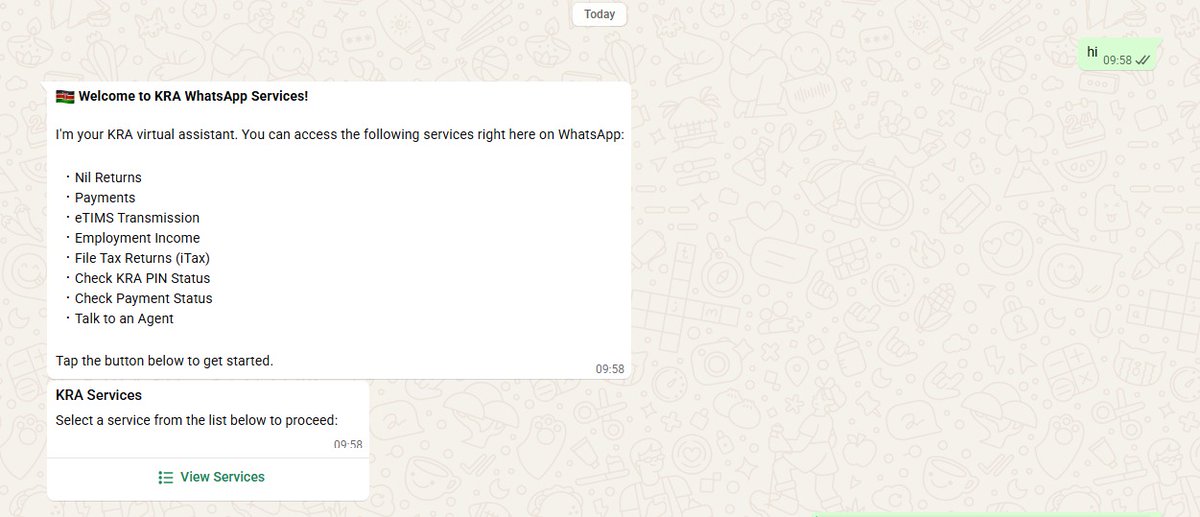
Save 0711 099 999 on your phone and send "Hi" on WhatsApp.
Shuru will guide you through the tax filing process. Tap View Services and select Employment Income.
Step 2: Verify Your Identity
Enter your KRA PIN or National ID number. Shuru will send a One-Time Password (OTP) to your registered mobile number. Enter the OTP on WhatsApp to proceed.
Once verification is complete, Shuru will automatically generate your IT1 Employment Income Summary, allowing you to review your tax information before submission.
Step 3: Review and Submit
Review the details in your summary. If everything is correct, tap Confirm & Submit.
You will receive a confirmation message once your tax return has been successfully filed.
Also Read: How to File Nil Tax Returns on KRA's iTax
With the introduction of KRA's WhatsApp chatbot, Shuru, taxpayers can now file Nil Returns directly through WhatsApp.
Step 1: Save 0711 099 999 on your phone and send "Hi" on WhatsApp.
Step 2: Shuru will display a list of available services. Select Nil Returns (usually the first option).
Step 3: Once selected, Shuru will guide you through the filing process. You will receive a confirmation message once your Nil Return has been successfully submitted.
"When you file your 2025 annual return, KRA validates the income and expenses you declare against available information. This helps improve accuracy, reduce fraudulent claims, and promote fair taxation," KRA advised.
"Confirm you have declared all income earned during 2025 (employment and other sources). Where applicable, ensure expenses claimed are supported by valid documentation, including compliant invoicing records. Verify that your withholding tax credits are correctly reflected before submission. If you make an error after filing, submit an amended return promptly."
.png)


Join 1.5M Kenyans using Money254 to find better loans, savings accounts, and money tips today.


Money 254 is a new platform focused on helping you make more out of the money you have. We've created a simple, fast and secure way to find and compare financial products that best match your needs. All of the information shown is from products available at established financial institutions that our team of experts has tirelessly collected.




.jpg)









%20(1).jpg)